PUESC
PUESC errors at login, signing and permissions
Three wrong passwords block access for 30 minutes, a signing problem is usually cured by changing browser, and a permissions error is not cured by resending.
Published · Author: Makaiev Kostiantyn Oleksandrovych, founder of Sigil RMPD
A dispatcher could not get into PUESC in the morning, because the password would not take. They tried three times, and after the fourth attempt the portal stopped asking for a password at all. The filing for the run sat still, the driver waited for a number, and the account was blocked for thirty minutes with not a word about it on the screen.
PUESC is the Polish fiscal and customs portal through which SENT and RMPD filings are made.
In short: three wrong passwords block access for 30 minutes, after which it returns on its own · an emergency code for two-factor login is available once in twenty-four hours and is valid for 10 minutes · for a signing problem the portal itself advises changing browser first and trying again · the customs certificate is free, you generate it yourself under "Mój pulpit | Moje dane", and the password to its key cannot be recovered · a channel permission error is not a transient error: in our own data 240 attempts over two days changed nothing · the same account can send filings successfully on one day and have no right to check their status, because those are different channels.
PUESC errors fall into two groups, and which one yours belongs to decides everything. A transient error, such as a dropped connection, passes by itself and resending helps. An access error, such as a missing channel permission or an invalid signature, will never pass, however many times you press send.
What to do when you cannot log in
Three wrong passwords block access to the account for 30 minutes, and the portal says nothing about it on screen. After 30 minutes the ability to log in returns automatically, with no action on your part. If you cannot wait, a Help Desk SISC consultant lifts the block over the phone.
Three things are worth having ready for that call, because the consultant will ask for them. They are the email address that serves as the account login, a PESEL number or the number of the document given at registration, and your first and last name. The account login is tied to a particular person, so that is exactly what the consultant checks.
A forgotten password is reset without a phone call. The login window carries a "Nie pamiętasz hasła?" option, where you enter the email address that is your login and a code from an image. If the details are right, an email arrives with a link to reset the password.
What to do when access to the code app is lost
Two-factor login has an emergency exit, and it carries two limits worth knowing in advance. The "Potwierdzenie logowania" view holds an option reading "Nie mam dostępu do aplikacji Google Authenticator", which sends a one-time code to the same mailbox that serves as the login.
The first limit: such a code may be used only once in twenty-four hours. Once that is exhausted the portal refuses and only Help Desk SISC remains. The second limit: the code is valid for 10 minutes from being sent, and after that it expires.
After a correct code the portal offers to switch the second factor off. It can be switched back on under "Moje dane", so the decision is not final.
What to do when the mailbox that is your login is lost
The case looks hopeless, yet a procedure exists and it depends on whether you hold a signature. Where a dispatcher has left the company along with their mailbox, this is exactly that case.
Without a qualified signature and without a profil zaufany there is one road: going in person, with a document proving identity, to the nearest customs and tax office, its branch or a customs post. The addresses sit on Podatki.gov.pl.
With a qualified signature or a profil zaufany the whole thing is done by email. An application for a new login states the old address, access to which has been lost, and the new address that will become the login. The application is signed, and the subject line must read "ZMIANA LOGINU PUESC PROCEDURA SPECJALNA", because without that subject the message goes elsewhere.
Why a document will not sign
PUESC accepts three kinds of signature, and it is worth knowing which one you hold. They are the kwalifikowany podpis elektroniczny, the podpis zaufany made with a trusted profile, and an advanced signature verified by a customs certificate.
The customs certificate is free, and that is the least known item on the list. You generate it yourself: log in to PUESC, go to "Mój pulpit | Moje dane | CERTYFIKATY CELNE" and press the generate button. Signing with it runs through the CertSign program, which on Windows installs the Ministry of Finance certification centre's own certificates on first run, after which they are available to Chrome and Edge.
One thing has to be done right first time while generating. The password to the key cannot be recovered, and losing it leaves generating a new key and a new certificate. Record it where the company keeps its other passwords, not in one employee's browser.
When a document will not sign, PUESC advises starting with the simplest step: change browser and try again. That is the portal's own advice rather than our guess, and it is worth doing before writing to the Help Desk. If the private key has become, or may have become, known to anyone else, the certificate has to be suspended or revoked at once through Help Desk SISC.
Why a filing bounces on missing permissions
Because PUESC has four communication channels and not every service is available on each of them. The channels are screen forms, a web service in system-to-system mode, email carrying a ready file, and uploading a document on the account. The page on channels advises outright checking the service description for whether it is offered over the web service channel.
From that come two messages that look opaque and mean the same thing. "Konfiguracja schematu nie zezwala na wysyłkę bieżącym kanałem" means this service does not travel by this channel. A message saying the user "nie jest uprawniony do korzystania z kanału SENT DIRECT" means the channel is missing a permission, not that the filing is bad.
The most unpleasant part is that an account can work by halves. In our own data, on 10 and 11 August 2026 the same nine filings went through successfully to the register via AcceptDocument and received their RMPD_110 confirmation, while checking their status via RMPD_406 bounced on permissions that same day. The carrier then sees "I cannot check the status" and draws the false conclusion that the account is broken. What the status check itself shows is set out in the piece on RMPD406.
Which errors are worth resending and which are not
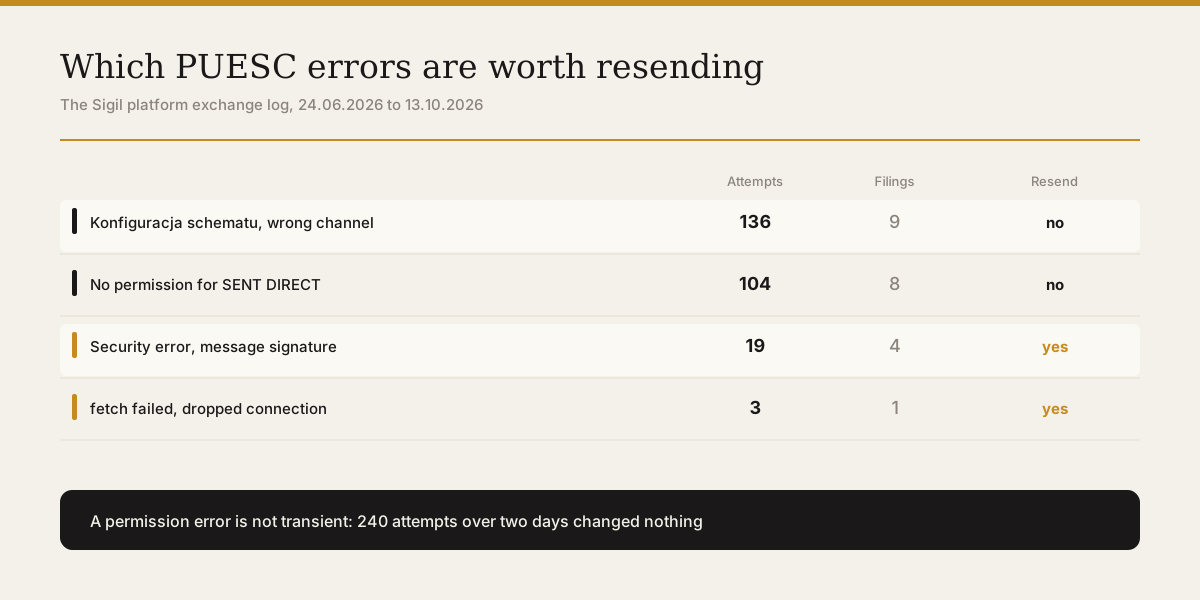
The division is simple and worth remembering. A transient error passes by itself; an access error never passes. Below are our own data for the period from 24.06.2026 to 13.10.2026, from the PUESC exchange log.
| Message | Attempts | Filings | Worth repeating |
|---|---|---|---|
| Konfiguracja schematu nie zezwala na wysyłkę bieżącym kanałem | 136 | 9 | no, a permission is needed |
| The user nie jest uprawniony do korzystania z kanału SENT DIRECT | 104 | 8 | no, a permission is needed |
| A security error was encountered when verifying the message | 19 | 4 | yes, an intermittent error |
| fetch failed, that is a dropped connection | 3 | 1 | yes, it passes by itself |
The first two rows are one and the same incident: 240 attempts over two days changed nothing, because a permission was missing on the portal's side rather than on the line. The third row is different: the message signature verification error met four filings across three months and passed between attempts, so resending makes sense. The fourth disappeared after three attempts.
These errors should not be confused with a refusal by the register itself. A refusal arrives with a code from R01 to R30 and means the filing reached the register but failed its checks; what each code means is collected in the piece on a PUESC refusal to register a filing. Where the portal is down altogether, the emergency procedure applies, described separately in the piece on PUESC being unavailable.
What to do
- Wait 30 minutes after three wrong passwords, because access comes back on its own.
- Have the login mailbox, a PESEL or the registration document number, and your name ready before calling the Help Desk.
- Generate the customs certificate in advance, because it is free and tends to be needed exactly when there is no time.
- Record the certificate key password where the company keeps passwords, because it cannot be recovered.
- Change browser before reporting a signing problem, because that is the portal's own first piece of advice.
- Read the text of the message before resending: a word about permissions means repeating will not help.
- Check whether the service you need is available on the channel you are sending it through.
What not to do
- Do not resend after a message about permissions. In our data 240 attempts over two days achieved nothing.
- Apply for the channel permission, because the problem sits with the account, not the filing.
- Do not assume the account is broken when the status check fails. Sending filings may be working perfectly meanwhile.
- Test sending and status checking separately, because they are different channels.
- Do not keep the certificate key password only in one employee's browser. It cannot be recovered, and the employee will leave.
- Keep it where the company keeps the rest of its passwords.
- Do not burn emergency login codes needlessly. One comes once in twenty-four hours and lasts 10 minutes.
Sigil handles RMPD declarations. Access to the PUESC account and the certificates stay with the company, because the account is theirs.
A demo or training for your team
30 minutes online. We show how Sigil™ files an RMPD from a CMR and answer questions about your runs.
Frequently asked questions
- Why can I not log in when the password is correct
- Because after three wrong attempts access is blocked for 30 minutes. The portal says nothing about it on screen, so it looks as though the password has stopped working. After thirty minutes login returns by itself. If you cannot wait, a Help Desk SISC consultant lifts the block over the phone.
- What to do when a document will not sign
- Change browser first and try again. That is PUESC's own advice rather than our guess, and it is worth doing before reporting to the Help Desk. If it does not help, check whether the Ministry of Finance certification centre's certificates are installed; on Windows the CertSign program installs them itself on first run.
- What does a customs certificate cost
- Nothing, it is free. You generate it yourself after logging in to PUESC, under "Mój pulpit | Moje dane | CERTYFIKATY CELNE". It is worth doing in advance, because it tends to be needed exactly when there is no time. The key password cannot be recovered, so record it where the company keeps its other passwords.
- What does it mean that a user is not authorised for the SENT DIRECT channel
- That the account lacks a permission, not that the filing is bad. PUESC has four communication channels and not every service is available on each. Resending will not help: in our data 240 attempts over two days changed nothing.
- Can sending work while the status check does not
- Yes, and it happens. In our data, on 10 and 11 August 2026 nine filings went through to the register and received confirmation, while checking their status bounced on permissions that same day, because it travels by a different channel. Test those two things separately.
Sources
Authorities:
- Logging in to a PUESC account, puesc.gov.pl: the 30-minute block after three wrong passwords, password reset, two-factor login, the emergency code once in twenty-four hours and valid ten minutes, the details Help Desk SISC needs, and the procedure for changing a login when access to the mailbox is lost.
- Electronic signing of documents, puesc.gov.pl: the three accepted kinds of signature, the customs certificate being free, generating it under "Moje dane", the CertSign program, the advice to change browser, and the impossibility of recovering the key password.
- Communication channels, forms and web services, puesc.gov.pl: the four communication channels and the fact that not every service is available on each of them.
Own data:
- Error messages, attempt counts and filing counts from the Sigil platform's PUESC exchange log, for the period from 24.06.2026 to 13.10.2026. The channel permission incident: 10 and 11 August 2026, 240 failed attempts across nine filings whose submission via AcceptDocument was going through. These are data of the carriers working through Sigil, not market statistics.
Read next
- Which PUESC account a carrier needsBasic or extended PUESC account: what each allows, what it takes, how long. A carrier needs only basic for RMPD; company registration is for consignors only.
- Registering on PUESC as a non-EU carrier, step by stepHow a non-EU carrier opens a PUESC account for Polish RMPD filings. Which account, what to prepare, every form screen, the e-mail code, ID SISC and three traps.
- Why PUESC rejects an RMPD and what to fix by RMPD500 codeRMPD500 rejection codes across 242 filings: R01 Cyrillic, R02 postal code, R06 dates, R30 locator not activated, crossing outside the dictionary. What to fix.
- What to do with RMPD and SENT when PUESC is downWhen Poland's PUESC portal is down, RMPD and SENT are filed with a replacement document by e-mail to GITD or KAS. Addresses, format, proof, can the driver go.
- RMPD406, checking an RMPD filing and its GPS positionRMPD406 checks whether an RMPD filing is valid and where the register last saw the truck. How to run it in PUESC and how Sigil runs and records it for you.
Sigil™ turns a CMR into an RMPD declaration and files it with PUESC, with every field checked against the original.
More about PUESC