PUESC
Registering on PUESC as a non-EU carrier, step by step
How a non-EU carrier opens a PUESC account for Polish RMPD filings. Which account, what to prepare, every form screen, the e-mail code, ID SISC and three traps.
Published · Author: Makaiev Kostiantyn Oleksandrovych, founder of Sigil RMPD

Monday, 22:10. The owner of two trucks in Rivne, Ukraine, has taken his first order into Poland since November 2024 and sits down to open an account on PUESC, the Polish customs and tax portal. The form is in Polish, six tabs, and the field "Numer identyfikacyjny osoby zagranicznej" comes with no explanation. He picks "rozszerzony zakres uprawnień" because "extended" sounds safer, reaches the end and learns that he now needs a qualified electronic signature or a visit to a Polish customs office. The truck loads on Thursday.
This article walks a non-EU carrier through registration on PUESC from the "Załóż konto" button to the first login. Which scope of rights to choose, what to have at hand, what goes into each field, how to confirm the account by e-mail, what ID SISC is, and what to do when the e-mail never arrives. For a reader outside Poland: PUESC is the portal where RMPD notifications are filed. Screenshots taken on 22.09.2026 from form WRR0001, version 2.00.001.
In brief: for RMPD a carrier needs a personal account with the basic scope of rights (podstawowy zakres uprawnień); no signature, no trusted profile, no company registration · one account per person, on that person's own data, first name only · a Ukrainian citizen must give the identification number from the home country (RNOKPP), date of birth, type and number of the ID document; PESEL only if one exists · password 8 to 75 characters, upper and lower case plus digits or special characters · after submission an e-mail with a code arrives; without confirmation within 24 hours the account is deleted and everything starts again · an error notice comes within 5 minutes, the UPO receipt and the ID SISC number within "kilka dni", a few days, under Mój pulpit | Dokumenty · three wrong passwords lock the login for 30 minutes; the Help Desk at +48 22 330 03 30 works around the clock.
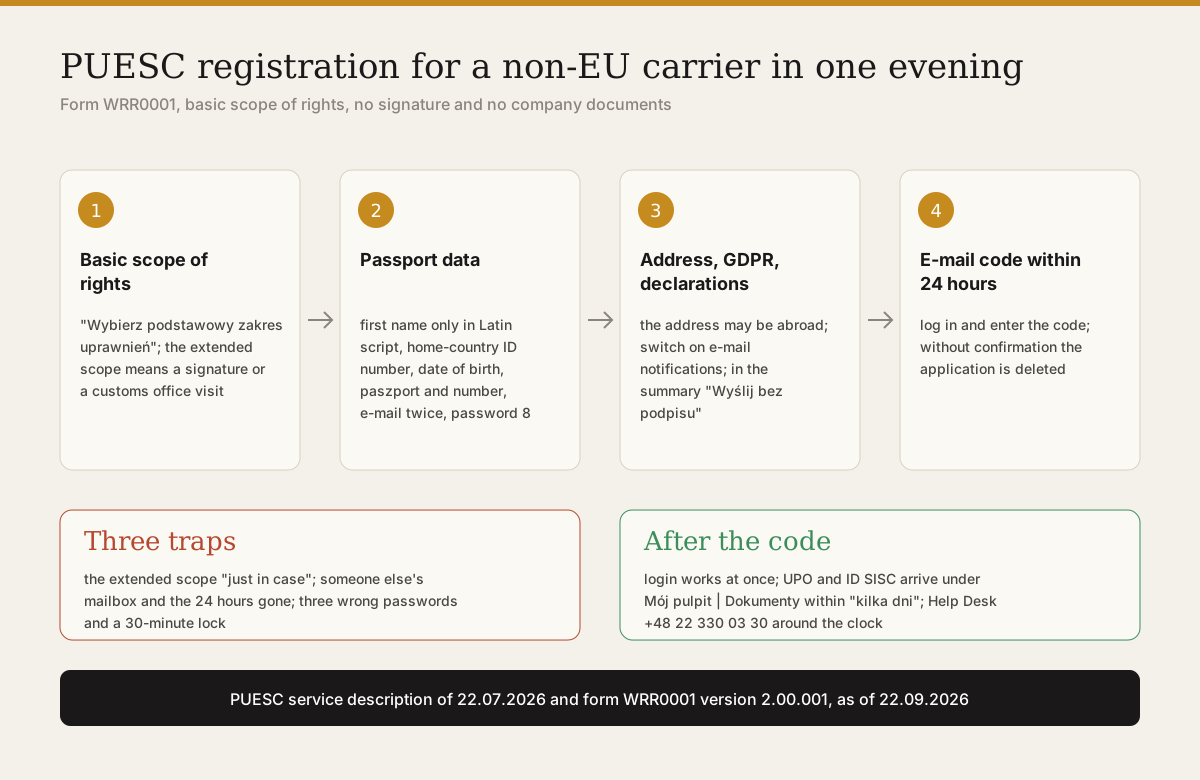
Registration on PUESC for a carrier is one form on six tabs, filled in within 15 minutes, with no signature and no company documents. You choose the basic scope of rights, enter your passport data in Latin script, a correspondence address and a phone number, accept the GDPR clause and the declarations, and click "Wyślij bez podpisu". Then an e-mail with a code, a login, and the account is ready for the RMPD100 form.
Which account a carrier needs and why no signature
A carrier needs an account with the basic scope of rights, and the portal says so on the RMPD service page: "Wybierz PODSTAWOWY ZAKRES UPRAWNIEŃ" (choose the basic scope of rights). A basic account may "zgłaszać i uzupełniać przewozy w SENT jako przewoźnik", that is file RMPD100 and complete someone else's SENT notification with carrier data. The application for a basic account goes out unsigned, with the "Wyślij bez podpisu" button, and nobody verifies identity.
The extended scope (rozszerzony zakres uprawnień) exists for acting on behalf of a company: filing SENT as consignor or consignee, customs declarations, applications. For it the portal demands identity confirmation by a qualified electronic signature, by the Polish trusted profile (profil zaufany), or in person at a customs office with a document. For a carrier from outside the EU that is weeks without any benefit. How the two accounts differ and who needs which is covered in Which PUESC account a carrier needs.
Does a company with five trucks and two dispatchers need the extended account? No. The account belongs to a person, not a company: "Konto zakłada osoba fizyczna na swoje dane" (an account is opened by a natural person on their own data). Each dispatcher opens a basic account in their own name, and the company data go into the RMPD100 form itself.
What to prepare before the form
Before the form, put your international passport, your home-country identification number and access to a mailbox you can read within the hour next to you. The PUESC service description of 22.07.2026 lists three items for a person without Polish citizenship. "Numer identyfikacyjny (nadany w kraju, którego jesteś obywatelem)", the number that identifies you in your own country. "Datę urodzenia", the date of birth. "Rodzaj dokumentu tożsamości oraz jego numer i serię", the type, number and series of the ID document. PESEL, the Polish personal number, only if you have one.
Write your first name and surname in Latin script exactly as in the passport. The same spelling goes into section 8 of every RMPD100, and at a roadside check the account is compared with the driver's document. The portal takes the first name only: "na PUESC możesz podać tylko pierwsze imię". A typo can be corrected later with a "korekta wniosku", a correction request, but that is another document and more days.
The correspondence address may be outside Poland. For a Polish address the form wants the fields in the order Województwo, Powiat, Gmina, Miejscowość, Kod pocztowy, Ulica, Numer domu, and in a village without street names the field "Ulica" takes the name of the locality (PUESC FAQ, ID 709854225). Phone number with the country code.
Decide the password in advance: 8 to 75 characters, upper and lower case letters plus digits or special characters. The e-mail address becomes the login, so do not use a driver's or an accountant's mailbox: changing the login without access to the old mailbox is a separate procedure with a signed request.
How to go through the form step by step
Form WRR0001 "Rejestracja danych osoby" has six tabs, and each opens with the "Dalej" (next) button only after the previous one is complete without errors. Below, every screen as of 22.09.2026.
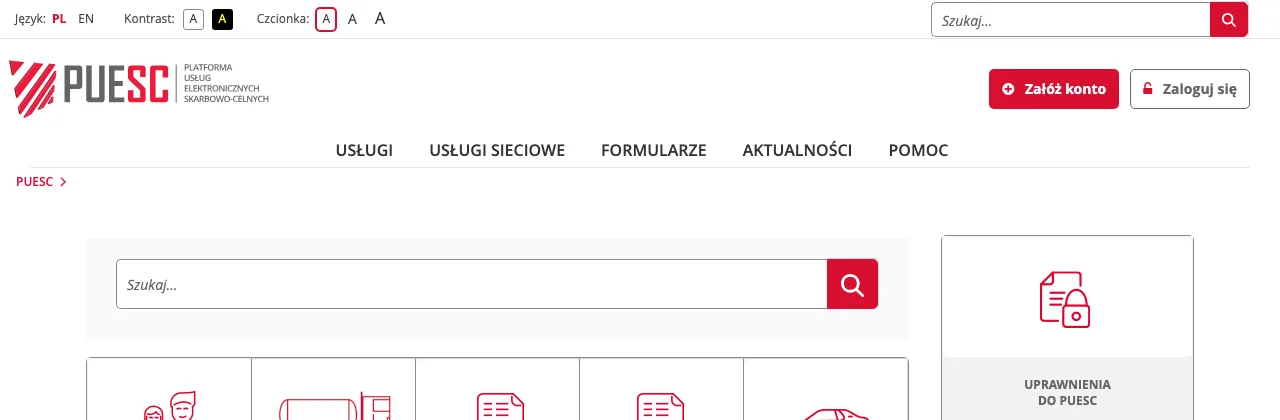
Step 1. Open puesc.gov.pl and click the red "Załóż konto" (open an account) button at the top right.
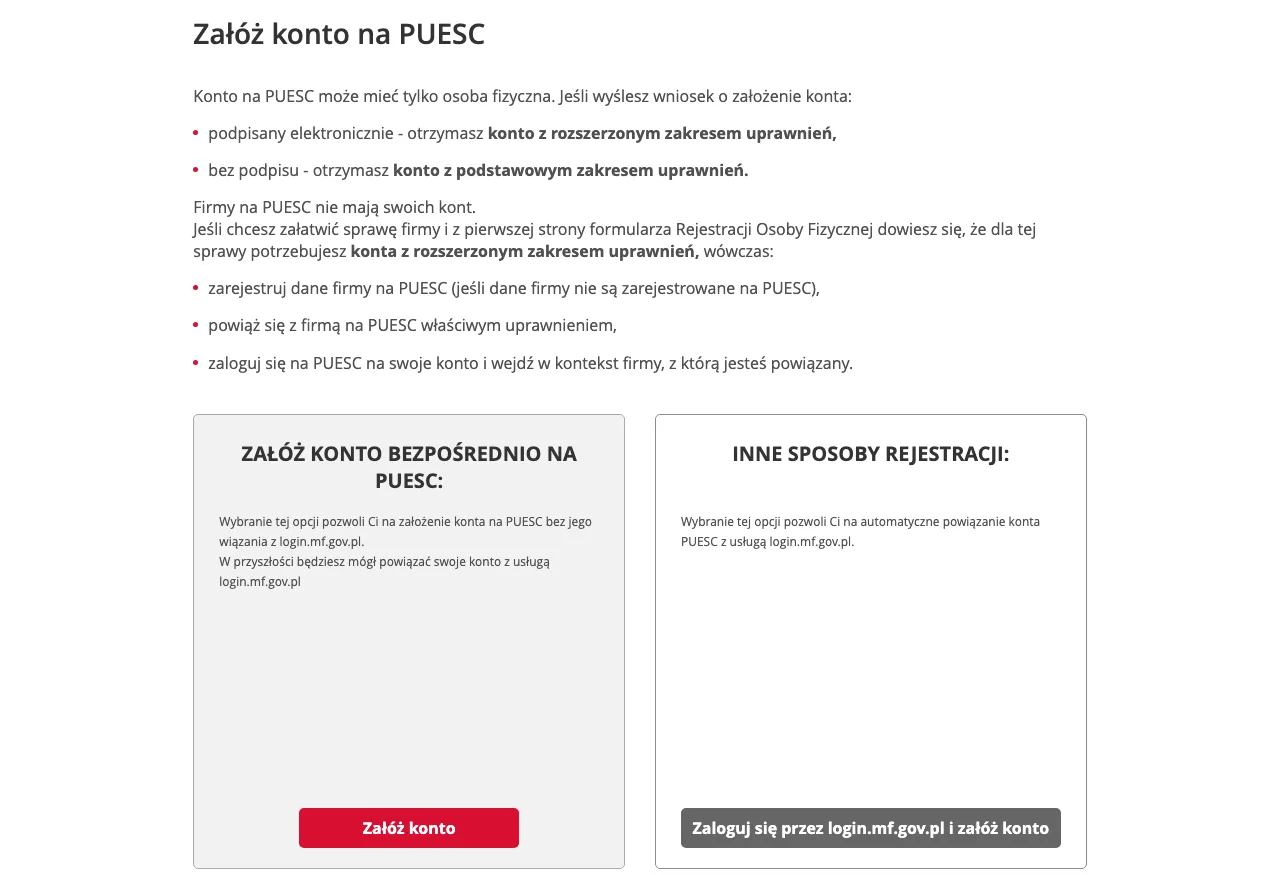
Step 2. On the page "Załóż konto na PUESC" choose the left card "Załóż konto bezpośrednio na PUESC" (open an account directly on PUESC). The right card goes through login.mf.gov.pl, that is the Polish trusted profile or a Polish bank, which you do not have.
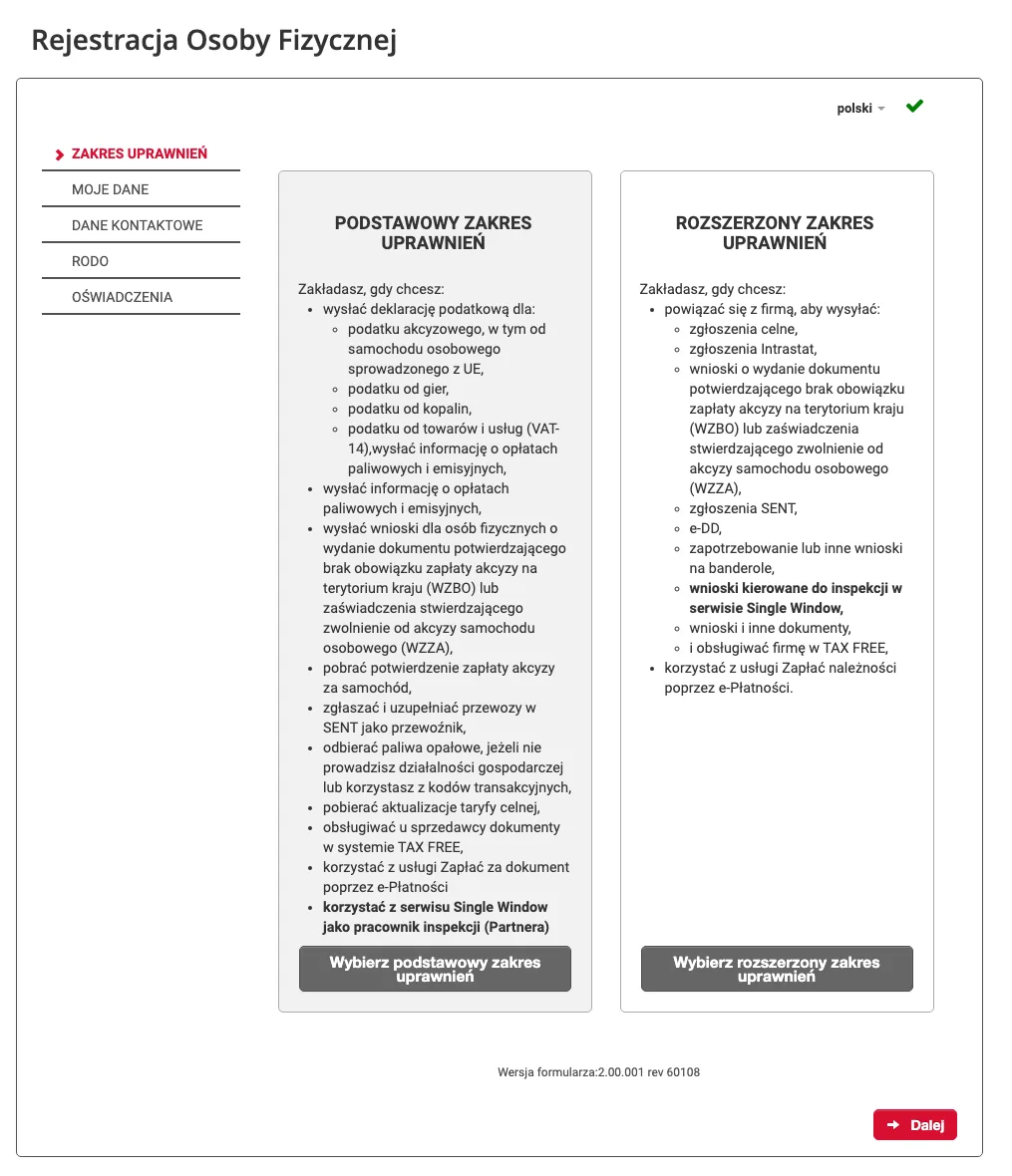
Step 3. Tab "Zakres uprawnień" (scope of rights). Click the grey button "Wybierz podstawowy zakres uprawnień" under the left column. The left column lists your item: "zgłaszać i uzupełniać przewozy w SENT jako przewoźnik".
Step 4. Tab "Moje dane" (my data). Fields with a red asterisk are mandatory. Left column: "Imię" (first name only), "Nazwisko" (surname), "Kraj obywatelstwa" (citizenship, pick Ukraina), "Numer identyfikacyjny osoby zagranicznej" (for a Ukrainian citizen the RNOKPP number). Then "Data urodzenia" (date of birth, YYYY-MM-DD), "Rodzaj dokumentu tożsamości" (pick paszport), "Numer i seria dokumentu tożsamości" (passport series and number). Right column: "Adres e-mail" and "Powtórz e-mail" (e-mail twice), "Hasło" and "Powtórz hasło" (password twice). The "PESEL" field has no asterisk; leave it empty.
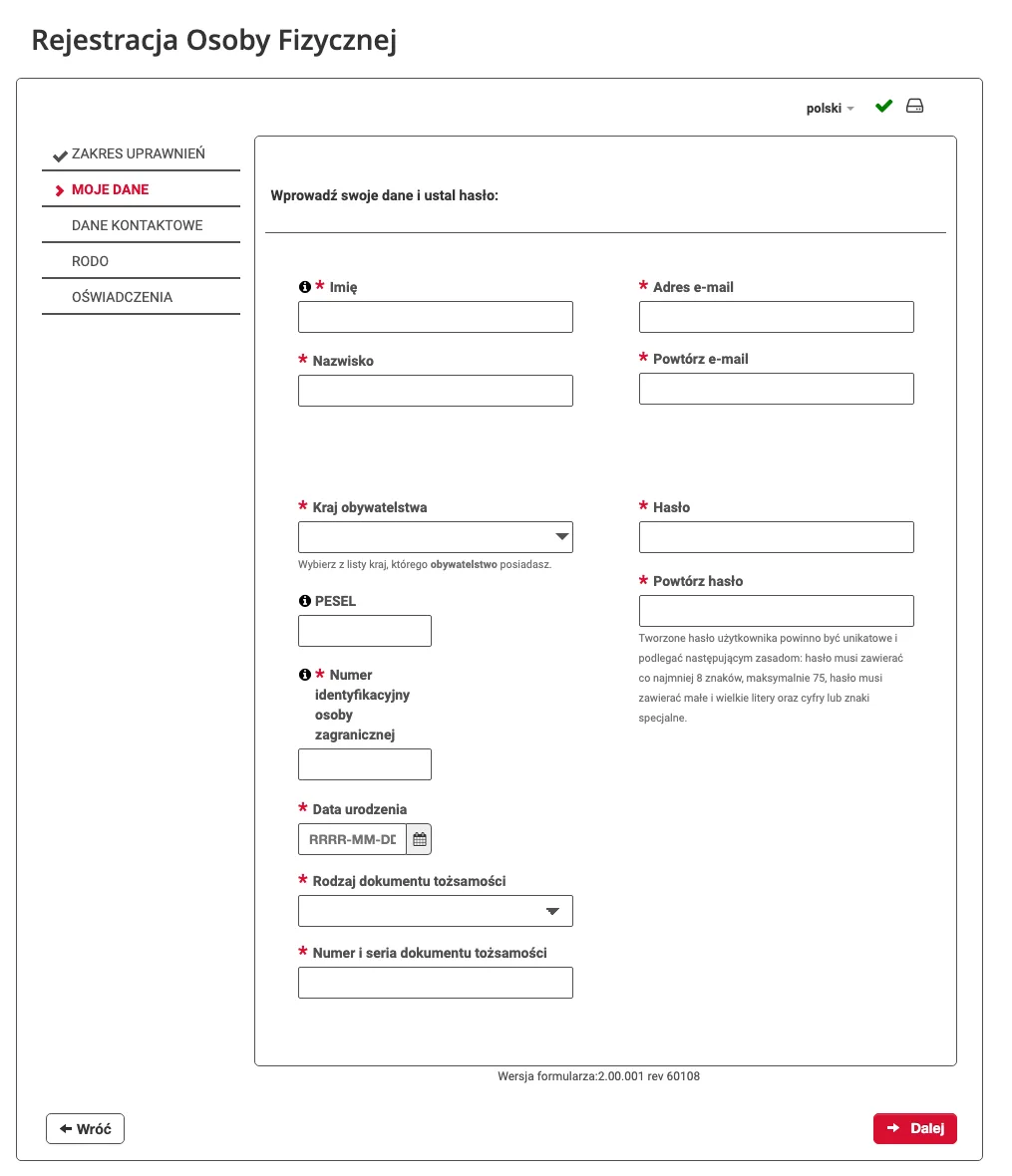
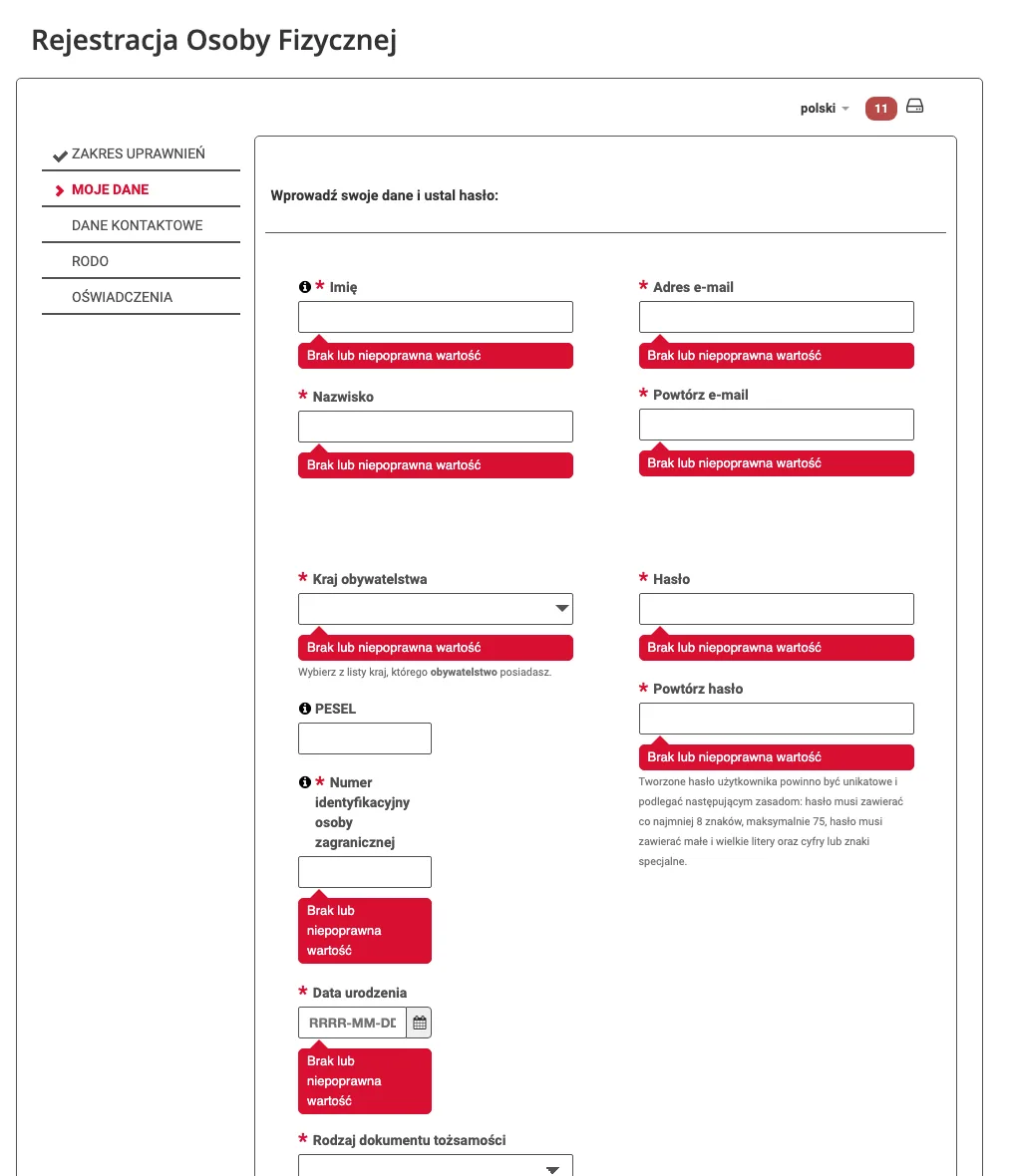
If you press "Dalej" with an empty field, the form marks each one in red with "Brak lub niepoprawna wartość" (missing or invalid value) and shows the number of errors next to the language flag. It reacts the same way to a date in the wrong format.
Step 5. Tab "Dane kontaktowe" (contact data): correspondence address and phone. Here is also the consent to e-mail notifications about a new document on the account; switch it on, because that is how you learn about your ID SISC without logging in daily. The tab "Dodatkowe dane" holds an optional declaration about the customs declaration manual; pass it with "Dalej".
Step 6. Tabs "RODO" (GDPR) and "Oświadczenia" (declarations): read the data processing clause and tick the required declarations. After "Dalej" the portal shows a summary with two buttons. For a basic account click "Wyślij bez podpisu" (send without signature). "Podpisz" leads to a qualified signature or trusted profile, which a carrier does not need.
How to confirm the account and what ID SISC is
After submission an e-mail with a confirmation code arrives at the address given, and registration must be completed within 24 hours. The service description puts it this way: "zaloguj się na PUESC, a następnie podaj otrzymany kod weryfikacyjny" (log in to PUESC and enter the code received). The FAQ adds the consequence: "Jeśli nie potwierdziłeś założenia swojego konta w ciągu 24 godzin, zostanie ono usunięte" (if you did not confirm within 24 hours, the account is deleted), and the form must be filled in again (PUESC FAQ, ID 652085342).
The application then goes for verification in the system, and the portal warns: "Może to potrwać kilka dni" (this may take a few days). The result appears under Mój pulpit | Dokumenty as two documents. The first is the UPO, Urzędowe Poświadczenie Odbioru, the official receipt confirming that the application was filed electronically. The second is called "Informacja o rejestracji danych i nadaniu ID SISC osobie fizycznej" and carries your ID SISC, the number under which the customs administration knows you. Among the prerequisites for RMPD the service page names only an account, the basic scope and a login, with no separate wait for ID SISC.
Do you have to wait for the UPO before logging in? No. Login works right after the code from the e-mail. UPO and ID SISC come as separate documents over a few days. They are worth watching, because instead of them a "Dokument wezwania do weryfikacji tożsamości osoby fizycznej" may arrive, a summons to complete the data with a list of what is missing.
What to do if the e-mail with the code did not arrive
First check the spam folder and the address in the application: the e-mail goes to the address you typed twice in "Adres e-mail". With a wrong address the e-mail will never come, and after 24 hours the application is deleted; then simply fill in the form again with the right address. With a correct address and no e-mail, wait 5 minutes: that is how long the portal gives itself for an error notice about the application (PUESC FAQ, ID 650797473).
If nothing has come within an hour, write to helpdesk-eclo@mf.gov.pl from the same address you put in the application, with the service name "Załóż konto lub sprawdź swoje dane" in the subject and the problem in the body. Or call +48 22 330 03 30, around the clock except the technical break from 21:00 to 22:00. The consultant will ask for your first name, surname, e-mail and the document number from the application.
How the test environment differs from the live one
The PUESC test environment lives at a separate address, test.puesc.gov.pl, with separate accounts and the banner "ŚRODOWISKO TESTOWE, używaj fikcyjnych danych" (test environment, use fictitious data). An account from puesc.gov.pl does not work there, and the other way round.
A carrier does not need the test environment: it serves those who write software that exchanges data with PUESC. A reference number from the test portal is worth nothing to an inspector on the road, and carriage without a notification costs 12,000 zł, about 141,000 ₴ at the NBU rate of 11.74 ₴/zł on 21.09.2026 (załącznik nr 3 lp. 3.2a of the Road Transport Act).
Where carriers get stuck most often
First trap: the extended scope. The application went out unsigned, and the portal waits for identity confirmation in person: "zostaniesz poproszony o potwierdzenie swoich danych rejestracyjnych w najbliższej siedzibie organu celno-skarbowego". A second application for the same person is impossible, because there is one account per person. The way out: write to the Help Desk asking to change the application, or wait for the summons and answer it.
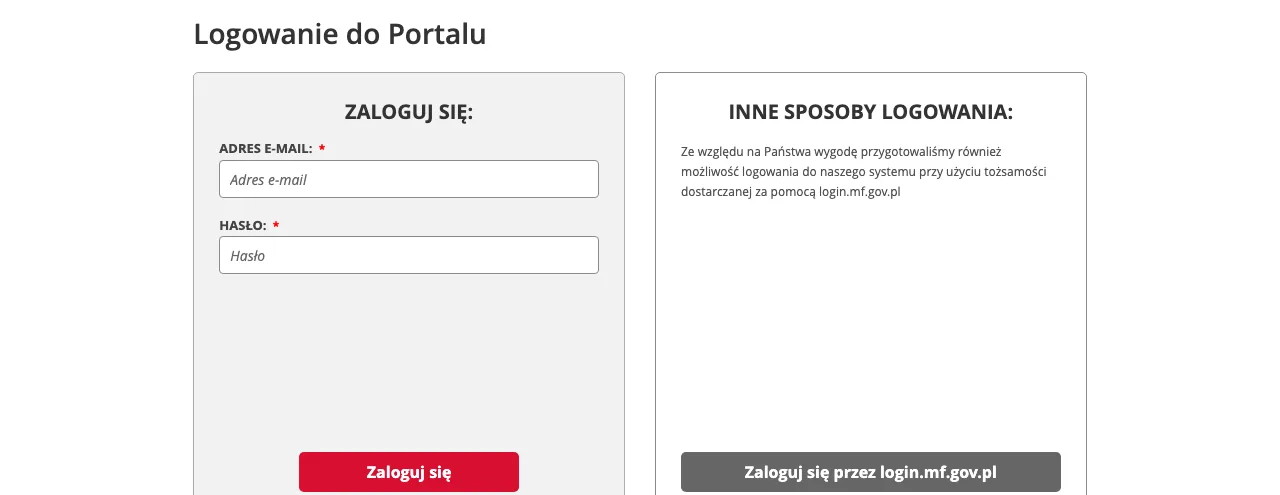
Second trap: the mailbox. The application went out from a company mailbox read once a week, and the 24 hours passed. Or the code arrived and the person looked for a "link" following older instructions. The way out: log in with the login and password from the application and enter the code in the window that appears.
Third trap: password and lockout. A password of digits and one capital letter is refused, and three failed logins lock the account for 30 minutes. The way out: "Nie pamiętasz hasła?" (forgot your password?) under the login button, an e-mail with a reset link, and a new attempt after half an hour. If waiting is impossible, the Help Desk unlocks the account by phone after the name, e-mail and document number.
What to do
- Put your international passport, home-country identification number, phone and an open mailbox you read yourself next to you.
- Open puesc.gov.pl, click "Załóż konto", then "Załóż konto bezpośrednio na PUESC".
- Choose "Wybierz podstawowy zakres uprawnień" and click "Dalej".
- Enter first name and surname in Latin script as in the passport, e-mail twice, Ukraina, the identification number, date of birth, paszport and its number, password twice.
- Enter the address and phone, switch on e-mail notifications, pass "Dodatkowe dane", GDPR and the declarations.
- Check the summary and click "Wyślij bez podpisu".
- Open the e-mail, log in to the portal and enter the code within 24 hours.
- After a few days check Mój pulpit | Dokumenty: the UPO and the ID SISC document, or a summons to complete the data.
What not to do
- Do not choose the extended scope "just in case". Without a signature it means a summons to a Polish customs office, and the basic scope is enough for RMPD.
- Do not put two names, Cyrillic or a patronymic in "Imię". The form takes the first name only, and a mismatch with the passport surfaces at a check.
- Do not register on someone else's mailbox. The login is the address, and changing it without access to the old mailbox needs a signed request.
- Do not leave the e-mail for tomorrow. After 24 hours without the code the application is deleted.
- Do not confuse test.puesc.gov.pl with the live portal. A notification from the test environment does not exist for an inspector.
Where technology fits in
Sigil works with the same basic PUESC account: in the settings you enter the login and password, and the system checks them on the portal at once, as described in the help article Syncing with PUESC. From there CMR data go into the RMPD100 one to one, the dispatcher confirms every field, and only after that confirmation does the notification go to PUESC through the official web service. What to do when PUESC rejects the first filing after registration is taken apart by code in The most frequent reasons PUESC rejects filings. When the portal itself is silent, the answer is in What to do with RMPD and SENT when PUESC is down.
Sigil does not register on PUESC for anyone: the account is opened by a natural person on their own data, and the e-mail with the code arrives in that person's mailbox.
Sigil handles RMPD declarations. The SENT notification is filed by the consignor or consignee, and every person opens their PUESC account themselves.
A demo or training for your team
30 minutes online. We show how Sigil™ files an RMPD from a CMR and answer questions about your runs.
Frequently asked questions
- Does a non-EU carrier have to register a company on PUESC?
- No. For RMPD100 a personal account with the basic scope of rights is enough. Company registration, a company ID SISC, an EORI number and a power of attorney are for SENT consignors and consignees, not for carriers.
- What goes into "Numer identyfikacyjny osoby zagranicznej"?
- The number that identifies you in your own country. For a Ukrainian citizen that is the RNOKPP tax number. The portal describes the field as "numer, który identyfikuje Cię w kraju Twojego obywatelstwa". PESEL only if you have one.
- How long does PUESC registration take?
- The form 15 minutes, the e-mail code the same day, ID SISC "kilka dni". Login works right after the code. The UPO and the ID SISC document arrive under Mój pulpit | Dokumenty within a few days.
- The e-mail with the code has not arrived. What now?
- Spam, address, Help Desk. Check the spam folder and the address in the application. An error notice comes within 5 minutes. Then write to helpdesk-eclo@mf.gov.pl from the address in the application or call +48 22 330 03 30. After 24 hours without confirmation the application is deleted; then fill in the form again.
- Can I register on test.puesc.gov.pl and file RMPD there?
- No. The test environment has separate accounts and fictitious data. A notification from there does not exist for a check, and carriage without RMPD costs 12,000 zł.
Sources
Service descriptions and answers on the PUESC portal, as of 22.09.2026:
- Załóż konto lub sprawdź swoje dane, PUESC, updated 22.07.2026: form WRR0001, data for a person without Polish citizenship, steps 1 to 6, e-mail code, UPO, ID SISC, "kilka dni".
- Rejestracja na PUESC, zakładanie konta, PUESC: one account per person, video guide.
- Logowanie do konta PUESC, PUESC: password reset, 30-minute lock after three attempts, login change without mailbox access.
- FAQ, Rejestracja na PUESC, PUESC: answers ID 650797473 (UPO, 5 minutes), 652085342 (24 hours), 709854225 (Ulica field), 772104604 (first name only), 652210007 (Help Desk).
- Zgłoszenie przewozu w przypadku międzynarodowego przewozu drogowego rzeczy, PUESC: "Wybierz PODSTAWOWY ZAKRES UPRAWNIEŃ".
- PUESC test environment: banner "używaj fikcyjnych danych".
Legislation:
- Act of 6 September 2001 on road transport, ISAP, consolidated text Dz.U. 2024 poz. 1539: art. 28b ust. 1, 3 and 10.
- Act of 9 March 2017 on the system for monitoring the road and rail carriage of goods (SENT Act) and Act of 19 March 2004, Customs Law, ISAP: legal basis of the registration service as stated by PUESC.
Rate: official hryvnia to zloty rate, National Bank of Ukraine, 11.74 ₴/zł on 21.09.2026.
Read next
- Which PUESC account a carrier needsBasic or extended PUESC account: what each allows, what it takes, how long. A carrier needs only basic for RMPD; company registration is for consignors only.
- Why PUESC rejects an RMPD and what to fix by RMPD500 codeRMPD500 rejection codes across 242 filings: R01 Cyrillic, R02 postal code, R06 dates, R30 locator not activated, crossing outside the dictionary. What to fix.
- What to do with RMPD and SENT when PUESC is downWhen Poland's PUESC portal is down, RMPD and SENT are filed with a replacement document by e-mail to GITD or KAS. Addresses, format, proof, can the driver go.
- What an RMPD is and who must file itRMPD from scratch: what the filing is, who must file it since 1 November 2024, when it is not needed, how it differs from SENT, what happens at entry without it
Sigil™ turns a CMR into an RMPD declaration and files it with PUESC — with every field checked against the original.
More on this topic: PUESC