RMPD
RMPD406, checking an RMPD filing and its GPS position
RMPD406 checks whether an RMPD filing is valid and where the register last saw the truck. How to run it in PUESC and how Sigil runs and records it for you.
Published · Author: Makaiev Kostiantyn Oleksandrovych, founder of Sigil RMPD
A Polish road inspector has stopped a truck forty kilometres from the border. The driver shows the RMPD number, but the inspector wants to know something else: whether the register has seen the truck over the last half hour. The driver has no idea whether the app was transmitting and calls the dispatcher. The dispatcher opens the filing in Sigil, presses "Check location", and within seconds sees the last position, recorded seven minutes earlier, and a signal history with no gap over the whole run.
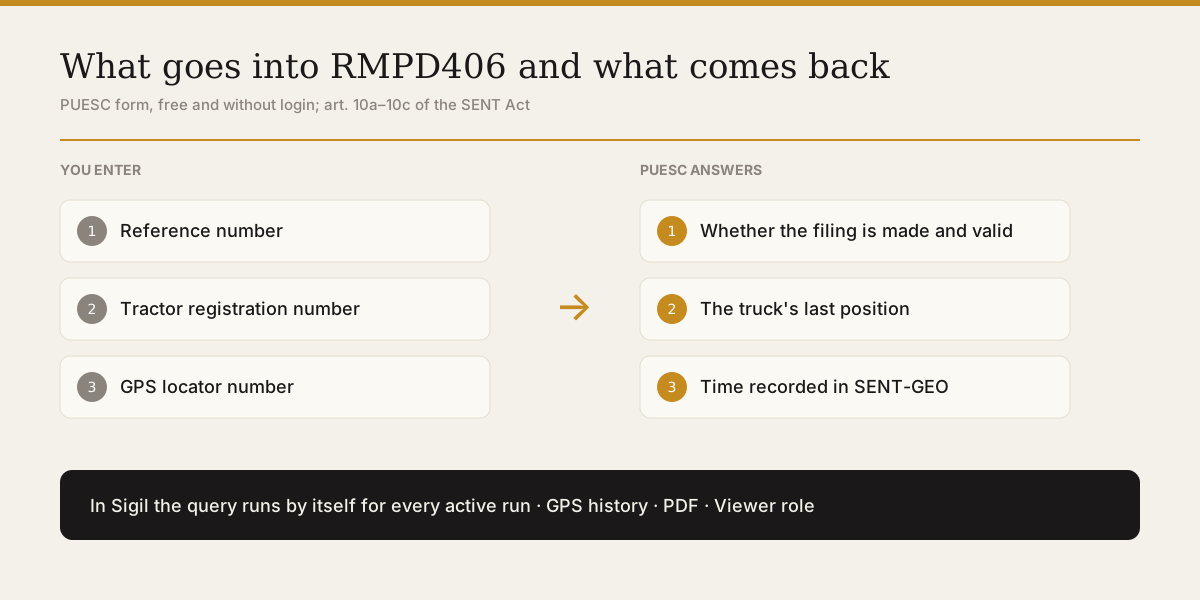
RMPD406 is the official PUESC form used to check whether an RMPD filing was made, whether it is still valid, and where the truck last was according to SENT-GEO. The form is free, needs no PUESC login and asks for three items: the reference number, the tractor's registration number and the locator number. In Sigil the query runs by itself for every active filing, and every answer goes into a history that a dispatcher or forwarder can open within a minute of a roadside stop.
In brief: the GITD document on the RMPD register describes RMPD406 as "Weryfikacja przez kierującego statusu zgłoszenia", a check of whether the filing was made and is current, together with the last GPS position · the form is free and needs no PUESC login, only the reference number, the registration number and the locator number · the answer gives the last position and the time SENT-GEO recorded it, while an answer without a position means the register received nothing for that number · RMPD406 does not work over the PUESC web service, only through the website, as PUESC support confirmed on 11 August 2026 · Sigil sends RMPD406 by itself: from 11 August to 7 October 2026 that came to 161,207 checks across 800 runs, half of which received more than 122 · one answer in seven (14.5 %) arrives without a position, and it is better seen before the inspector sees it · a forwarder holding the Viewer role checks the location and downloads the GPS history as a PDF without the carrier's PUESC login.
What RMPD406 is
RMPD406 is the form for checking a filing in the RMPD register together with the truck's last position. The GITD document on the RMPD register lists three forms for a carrier from outside the European Union: RMPD100 to file, RMPD to update and RMPD406 to check. The last of these is described in these words: «Weryfikacja przez kierującego statusu zgłoszenia (czy zgłoszenie zostało dokonane i jest aktualne)», meaning a check by the driver of whether the filing was made and is current.
The number 406 is a message number in the PUESC vocabulary. The reply carries number 416 in the same vocabulary, which is why both codes turn up in software and correspondence. The SENT system has a parallel form, SENT406, that does the same for SENT filings. How RMPD406 sits alongside RMPD100, 101, 103 and 104 is set out in the piece on RMPD document types.
The check is useful at three moments. Before the border, to confirm that the register already sees the truck. On the road, when the driver is unsure whether the app is transmitting. And during an inspection, when the question of whether the problem is real needs an answer quickly.
How to run RMPD406 yourself in PUESC
Running RMPD406 by hand takes three steps, with no login and no fee. That is how PUESC itself describes the service on its page "Sprawdź dane geolokalizacyjne środka transportu", updated on 23 April 2026.
- Gather three items: the filing's reference number, the tractor's registration number and the number of the GPS device or locator.
- Open the check form, enter the three items and press "Zatwierdź".
- Read the answer: the last location together with the time SENT recorded it.
A position does not always appear. PUESC names three conditions: the check has to be made while the filing is valid, the filing has to be complete, carrier data included, and the locator's data has to reach SENT-GEO correctly. If any one condition fails, the answer comes back without a position.
The locator number is usually the obstacle. A dispatcher knows the reference number and the tractor plate by heart, yet sees the locator number only in the filing form. Writing it on the trip sheet before departure saves time at the roadside.
What an RMPD406 answer means
An RMPD406 answer says two things: the state of the filing and the truck's last position. Both have to be read together, because a valid filing without a recent position looks to an inspector just as bad as a gap in transmission.
| What the answer shows | What it means | What to do |
|---|---|---|
| Last position and the time it was recorded | the locator transmits and the register sees the position | compare that time with the current time; more than an hour without a new fix is already a failure under the law |
| An answer without a position | SENT-GEO has received nothing for that number | check whether the driver started transmitting under the same filing number |
| Filing not valid | the number has expired or is the wrong one | to an inspector that is carriage without a filing, which costs the carrier 12,000 zł |
The hour runs from the last position in the register, not from the moment someone noticed the problem. The law requires the driver, when the locator has failed for more than an hour, to stop at the nearest car park (art. 10c ust. 1 of the SENT Act).
Why software cannot send RMPD406 directly
RMPD406 answers only on the PUESC website and does not answer at all over the web service through which software submits filings. PUESC support told us so in plain words on 11 August 2026: the query «jest dostępny jedynie poprzez WWW», available only through the website. The same query sent over the service is refused at the gate, before PUESC looks at the document.
One consequence follows for a carrier. Any software promising to track position through RMPD406 has to use the PUESC website just as a person would. Sigil does exactly that, under the carrier's own login, and reads the website's answer into the same fields as a 416 reply: position, time and filing status.
How Sigil automates RMPD406
Sigil sends RMPD406 by itself for every active filing, with nothing for the dispatcher to press. Checks follow a schedule in which each filing has its own next due time, and the pass repeats every four minutes. Every answer is recorded with its time, position and status, including answers that carry no position.
Silence is counted from the last position the register saw. When it reaches 45 minutes, Sigil sends a message, a quarter of an hour before the one-hour limit after which the driver has to stop.
Three safeguards keep false alarms out. The countdown starts only once SENT has confirmed the locator at least once for that filing, so a truck still standing at its loading point does not wake the dispatcher at night. Messages go out only once the truck is in Poland. And Sigil does not write about a truck that was standing still before the silence, because such messages would bury, day after day, the one that matters.
A separate message arrives when the signal returns and the truck turns up far from where it went quiet. The message states how many kilometres it covered without transmitting, because that stretch is exactly what an inspector will treat as the offence.
Besides the schedule there is a "Check location" button on the filing card. The button sends RMPD406 at once and shows the last position on a map within seconds. At least 20 seconds have to pass between two such checks of the same filing, because SENT-GEO will not produce a new fix any faster.
Where Sigil keeps the signal history
Every RMPD406 answer goes into the "GPS history" block on the filing card, and that block stays there after the run has ended. Times are shown in Warsaw time, the way a Polish inspector sees them, rather than by the clock on the driver's phone.
The history can be downloaded as a PDF with the "Download GPS history" button. The file is built at the moment of the click from the same records, and no credit is charged for it. For explanations after an inspection it is a list of what PUESC answered at every minute of the run, not a reconstruction from the driver's memory.
Such a record also matters in a dispute over a penalty. How a Polish court weighs evidence of position transmission is covered in a separate piece on the ruling on a signal gap.
What a forwarder does when the truck is stopped in Poland
A forwarder whom the carrier has invited into Sigil with the Viewer role sees within a minute what the dispatcher sees. The role files and changes nothing, yet it can press "Check location" and download the GPS history. The carrier sends the invitation from the account settings with the "Invite user" button.
- Open the filing from the list by tractor plate or RMPD number.
- Press "Check location" and see when the last position was recorded.
- Tell the driver to stop if more than an hour has passed since the last position, and to stay put until the signal returns.
- Find in "GPS history" where the gap began, so that any explanation rests on a time rather than a guess.
- Download the PDF and keep it together with the inspection report.
Can a forwarder check the position without access to the carrier's PUESC account? Yes. Through Sigil with the Viewer role, or by hand with the RMPD406 form if the driver reads out three items: the reference number, the registration number and the locator number.
What our data show about RMPD406
According to our data, from 11 August to 7 October 2026 Sigil sent 161,207 RMPD406 queries for 800 filings. Half of the runs received more than 122 checks, one in ten more than 428, and the longest run 1,758. Each check is a separate query to the PUESC website under the carrier's login.
One answer in seven, 14.5 %, came back without a position. Such answers are not spread evenly along a run, and what lies behind them in the different phases of carriage is examined in the piece on SENT-GEO position requests. The conclusion for a dispatcher is simple: an answer without a position has to be seen before the inspector sees it.
What a signal gap costs
A gap in position transmission on a run under RMPD costs the carrier 10,000 zł (załącznik nr 3, lp. 3.2b). The driver pays a separate 2,000 zł for breaching the duties tied to the locator (załącznik nr 1, lp. 2b). The amount for a specific case can be worked out in the SENT and RMPD fine calculator.
What to do once the signal has already gone is laid out step by step in the piece on losing GPS on the road, including what to check in the app during the first ten minutes and what to show an inspector.
What to do
- Write the locator number on the trip sheet, because without it RMPD406 cannot be run by hand.
- Run RMPD406 straight after departure, before the border, to see the first position in the register.
- Invite the forwarder into Sigil with the Viewer role if the forwarder answers for the run to the cargo owner.
- Answer a 45-minute silence message with a call to the driver, not with another check.
- Download the GPS history as a PDF after every roadside inspection and keep it with the report.
What not to do
- Do not treat an answer without a position as a technical detail, because to the register it is silence, and silence beyond an hour costs 10,000 zł. ✓ Check the filing number in the driver's app.
- Do not run RMPD406 by hand every minute, because SENT-GEO will not produce a new fix any faster. ✓ Rely on the schedule and on the button with its 20-second interval.
- Do not rebuild the run from the driver's memory after an inspection. ✓ Use the recorded PUESC answers with the time of each one.
- Do not hand the forwarder the carrier's PUESC login to let them watch the position. ✓ Invite the forwarder into Sigil with the Viewer role.
Sigil does not transmit the truck's position and does not replace the locator or the driver's app. The device or the app sends the position to SENT-GEO, while Sigil asks the register through RMPD406, records the answers and shows them to the dispatcher and the forwarder.
A demo or training for your team
30 minutes online. We show how Sigil™ files an RMPD from a CMR and answer questions about your runs.
Frequently asked questions
- Do you need a PUESC login to run RMPD406
- No. PUESC describes the service as free and available without logging in. Three items are needed: the reference number, the tractor's registration number and the locator number.
- How does RMPD406 differ from SENT406
- By register, not by logic. RMPD406 checks an RMPD filing and SENT406 a SENT filing, and both forms return the filing's state and the last GPS position.
- What does an RMPD406 answer without a position mean
- That SENT-GEO has received nothing for that number. First check whether the driver started transmitting under the same filing number. If the silence lasts an hour from the last position, the truck has to stop.
- Does Sigil run RMPD406 by itself
- Yes. For every active filing on a schedule, and every answer is recorded in the GPS history in Warsaw time. A separate "Check location" button runs a check on demand.
- Can a forwarder see the position of the carrier's truck
- Yes, if the carrier has invited the forwarder into Sigil with the Viewer role. That role can check the location and download the GPS history as a PDF, but cannot file or change anything.
Sources
Legal acts:
- Ustawa z dnia 9 marca 2017 r. o systemie monitorowania drogowego i kolejowego przewozu towarów oraz obrotu paliwami opałowymi, ISAP: art. 10a, art. 10b, art. 10c ust. 1.
- Ustawa z dnia 6 września 2001 r. o transporcie drogowym, ISAP, consolidated text Dz.U. 2024 poz. 1539 as amended by Dz.U. 2024 poz. 1544: załącznik nr 1 lp. 2b, załącznik nr 3 lp. 3.2a and 3.2b.
Authorities:
- Sprawdź dane geolokalizacyjne środka transportu, PUESC, service description, updated 23.04.2026: three items, three conditions, free and without login.
- Rejestr RMPD, GITD, gov.pl: forms RMPD100, RMPD and RMPD406.
Own data: 161,207 RMPD406 queries in Sigil from 11.08 to 07.10.2026 across 800 filings, median 122.5 per filing, 14.5 % of answers without a position. PUESC support's reply of 11.08.2026 that RMPD406 is available only through the website.
Exchange rate: NBU, 11.5966 ₴ per zł on 07.10.2026.
Read next
- RMPD100, 101, 103, 104 and which document to file whenRMPD documents by code: 100 registration, 101 amendment, 103 closing, 104 cancellation, 406 GPS check. When to file each, the 9-day rule, what open filings do.
- How often SENT-GEO checks your truck's position in PolandGPS monitoring in SENT on our own data: 212 position checks per transport, where the signal really gets lost, how much silence is a problem, what to do.
- What a driver should do when GPS loses signal in PolandThe SENT locator went silent on the road. What to check in the first ten minutes, when art. 10c says stop, what the dispatcher does, what to show an inspector.
- Court quashed a 10,000 zł SENT GPS fine, how to appealThe driver's app showed green while SENT saw 4 hours of silence. The Kraków court quashed the 10,000 zł fine as automatic punishment. What to do about yours.
- What SENT-GEO demands of the carrier and the locatorWhat Poland's SENT-GEO demands of carrier and driver: a locator on the whole Polish leg, three ways to transmit (e-TOLL PL, OBU, ZSL), on and off times, fines.
- What an RMPD is and who must file itRMPD from scratch: what the filing is, who must file it since 1 November 2024, when it is not needed, how it differs from SENT, what happens at entry without it
Sigil™ turns a CMR into an RMPD declaration and files it with PUESC, with every field checked against the original.
More about RMPD