Adding an EKMT book
Updated
This is how you add an EKMT book Sigil does not know yet. Three fields, one minute.
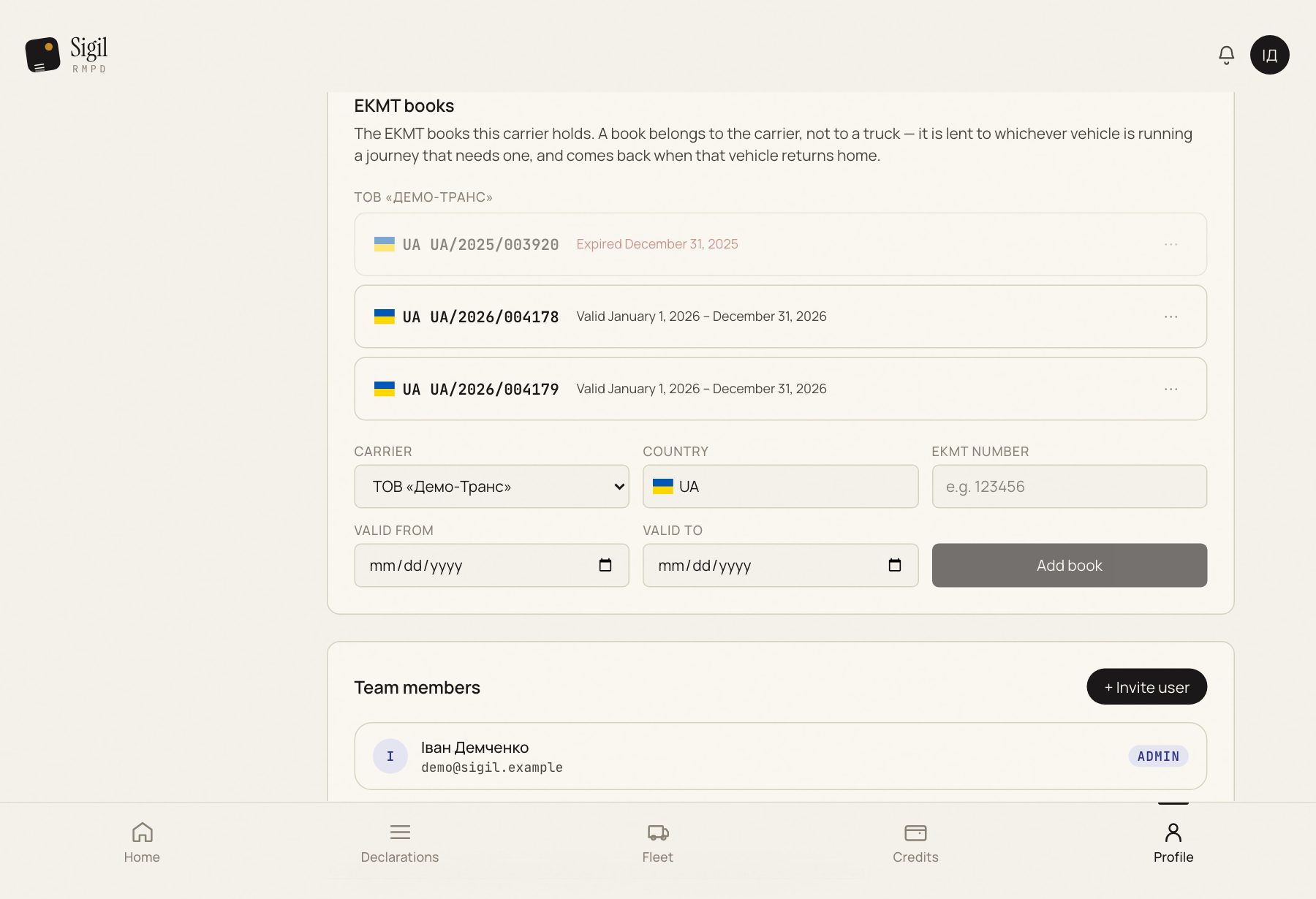
- Open Profile → Company profile and find the "EKMT books" block.
- Press Add book.
- Carrier: whose book it is. If there is one carrier, it is already chosen.
- EKMT number: from the book's cover, for example 123456.
- Valid from and Valid to: the validity from the book. If you do not know, leave them empty; Sigil takes the dates from the first PUESC confirmation naming this book.
- Press Save. "Book added" appears.
What happens next
The book is on the list and in the suggestion in the RMPD form for this carrier.
If something is wrong
- "This carrier already holds a book with that number." It is already added, perhaps from the PUESC history. Find it on the list.
- "Add a carrier profile first". A book belongs to a carrier, and there is no carrier yet. Create one in the "Carrier profiles" block above.
- The "to" date is earlier than the "from" date. Swap them.
See also
A demo or training for your team
30 minutes online. We show how Sigil™ files an RMPD from a CMR and answer questions about your runs.