Language and interface
Updated
Language, theme and text size are changed in the user menu. This touches only the screen: declarations, CMR data and what goes to PUESC stay as they were.
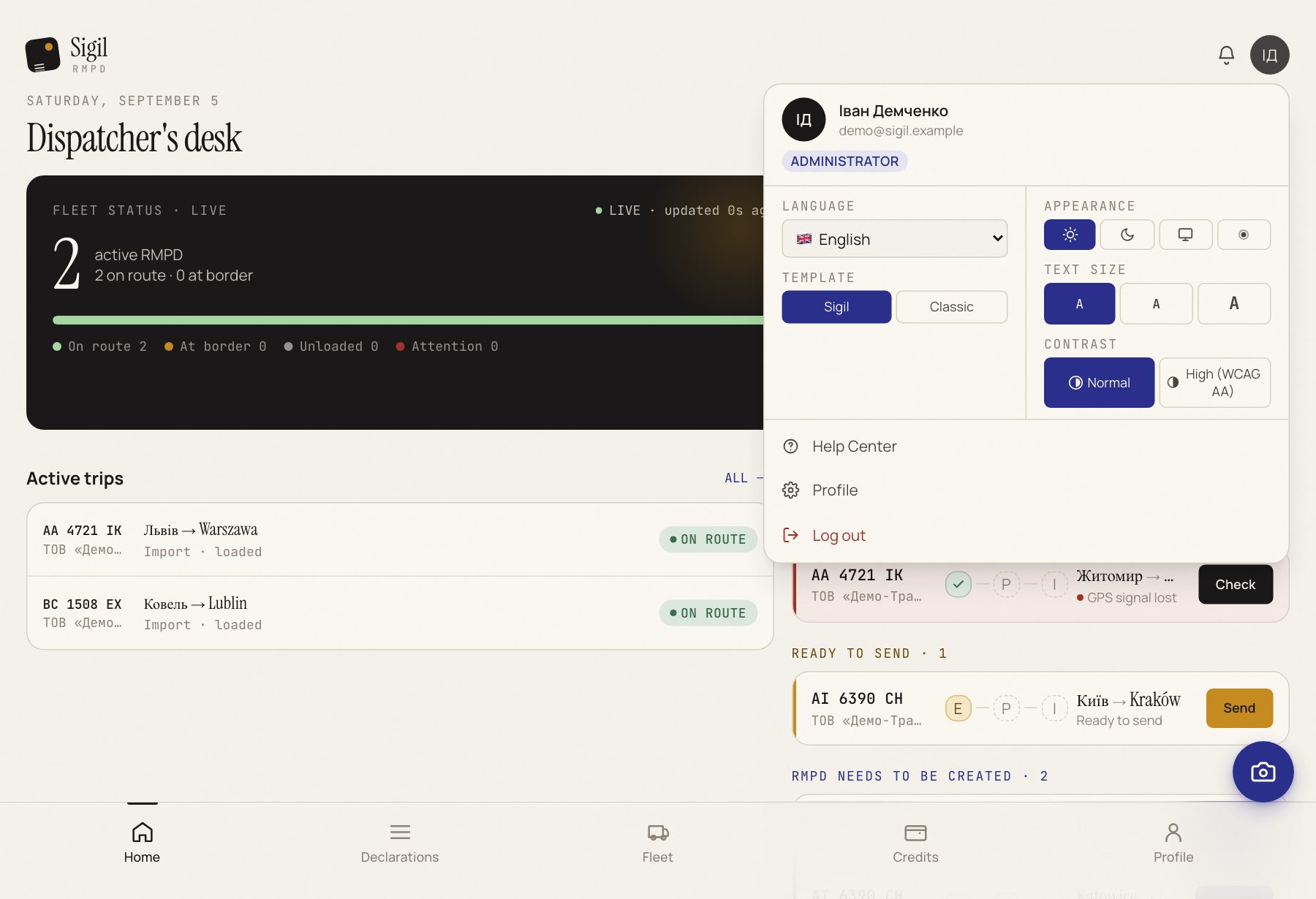
Language
- Press your name in the top right.
- Choose Language.
- Press one of the four: English, Ukrainian, Polish, Russian.
The screen switches at once: menu, buttons, statuses, hints and this Help Center. Sigil remembers the choice for your account.
Appearance
- In the same menu choose Appearance.
- Color theme: light, dark, as in the system, or amber for low vision.
- Text size: normal or large. Large works well on a phone.
- Contrast: stronger when the screen washes out in the sun.
- Template: "Sigil" or "Classic". Classic draws the declaration form the way it looks on the PUESC portal, with the same section numbers. Handy for those who filed on the portal for years.
What does not change
The interface language does not translate data. The sender's name from the CMR stays as it is on the CMR. The same thing goes to PUESC regardless of the screen language.
See also
A demo or training for your team
30 minutes online. We show how Sigil™ files an RMPD from a CMR and answer questions about your runs.